
Home » Agentic Era » Your Team Works Hard. So Why Is Productivity Still Falling?
Your Team Works Hard. So Why Is Productivity Still Falling?

How to Increase Employee Productivity?
When a startup grows and brings in talented people, it should move faster. However, the reality is often the opposite. Yet with more people and stronger skills on the team, decisions slow down and communication starts to break. Reorganizing the team or setting new KPIs rarely gets to the root of it.
Many startups face these challenges as they scale from their early stages. If you are trying to increase employee productivity, the answer might be hiding where you least expect it.
Case: The Day Information Silos Crashed the Server
This situation occurred at a growing startup. The marketing team launched a major promotion. The moment it went live, traffic spiked and the server went down. The infrastructure team never saw it coming.
The company realized that casual desk conversations were no longer enough once the team grew beyond 20 people. To prevent it from happening again, they started logging events on Google Calendar and sending advance notices on Slack.
However, the situation actually became worse. Team members ended up duplicating the same information across Calendar, Slack, Notion, and Confluence. This led to mistakes and missing data. These inefficient processes also delayed onboarding for new hires and created confusion for other departments. The effort to improve productivity had produced the opposite. More errors, more confusion, and the same questions asked over and over.
5 Stages of Productivity Loss Most Startups Never See Coming
Productivity loss in a growing startup is rarely about a lack of effort. It happens because information does not flow correctly. Research conducted by Panopto and YouGov shows that employees waste 5.3 hours every week just waiting for information. For any leader wondering how to increase employee productivity, this friction is the first thing that must be addressed before it leads to these five stages.
Too Many Tools, Too Little Context
As departments become specialized, they adopt their own tools. Marketing uses Notion, developers use Jira, and sales uses a CRM. Information gets stuck in isolated pockets, and seeing the full picture becomes nearly impossible.
Meetings That Could Have Been a Search
When individuals cannot find the information they need, the first resource leak occurs. After digging through documents and coming up empty, they send a DM or schedule a meeting. What should have taken one quick search ends up pulling two or three people into a meeting.
Information Trapped in Silos
Individual search failures spread to the entire team. Knowledge that is common in one department is completely unknown to another. That gap breeds distrust between teams and creates extra documentation work that should never have been necessary.
Onboarding That Never Really Ends
New hires cannot settle in. With no way to learn context on their own, new hires have no choice but to keep asking. Meanwhile, existing team members get pulled into training again and again. The headcount grows, but real output stays flat.
Decisions That Get Made Twice
This is the most dangerous stage. Teams revisit the same discussions because no one can find what was already decided. This means the organization is not learning from its experience. A team that keeps repeating itself cannot move forward.
It All Comes Down to Information Search.
These five stages all trace back to the same root problem. How your team finds information. To fix this, many teams try writing detailed manuals or building their own internal search tools. However, these methods usually fail for several reasons.
- The Hero Problem: A tool built by one brilliant developer gets abandoned the moment that person walks out the door.
- New Tab Hell: Switching to a separate dashboard mid-workflow kills adoption before it even starts.
- The Permission Paradox: Open it up too much and an intern might see salary data. Lock it down too hard and nobody can find anything.
Furthermore, simple keyword search is not enough. If a search for “last week’s meeting” brings up 100 different files, the user still has to waste time digging. Startup information is not static. It lives in Slack threads, emails, and Notion pages. Sometimes a decision made an hour ago is more important than a document from last month.
What to Look for Before You Commit to a Solution
Adding a search bar is not enough. To truly increase employee productivity, a solution must meet these four standards.
Does it provide intelligent answers?
A tool that returns 100 files for one question just creates another problem. A real solution uses AI like RAG (Retrieval-Augmented Generation) to summarize the exact answer based on the intent of your question.
Does it integrate with your existing workflow?
If a tool requires a new tab or a dashboard, people will not use it. It should work inside Slack or Google Chat. If people have to learn a new tool, they will not use it.
Does it solve security and permissions in real time?
Security is non-negotiable. The tool must respect existing permissions from apps like Notion and Google Drive. It should provide accurate information only to authorized users without extra setup.
Is there zero maintenance burden?
Engineering resources should be focused on the product. If it needs a dedicated person to maintain or breaks every time an API updates, it has already failed.
Indexing thousands of pages is not enough on its own. What startups need is an agentic layer that works from day one and draws real answers out of fragmented data.
The Only Answer: Refinder
Refinder meets all these difficult conditions and solves the information problem for startups.
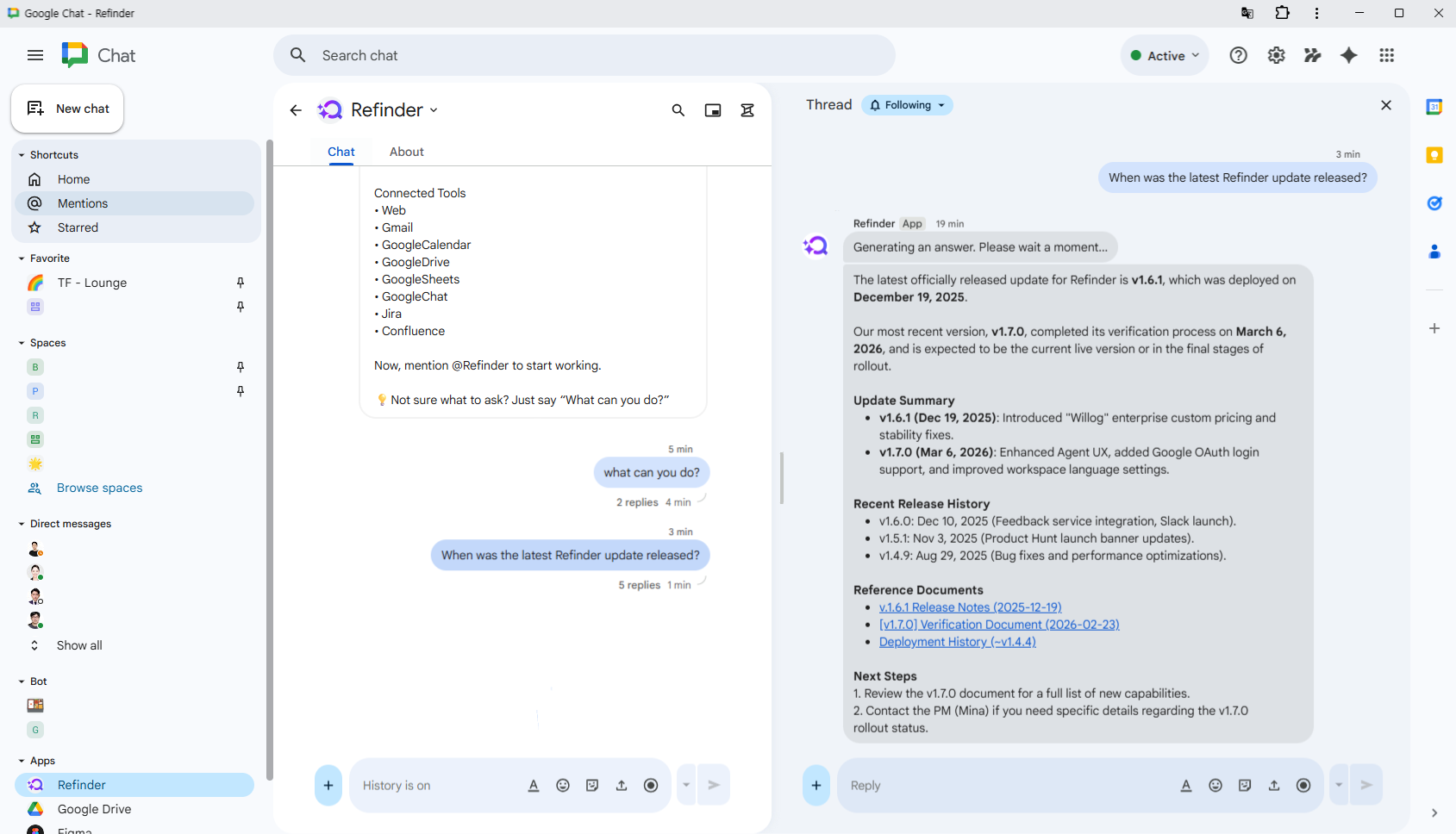
- Intelligent Answers: It uses RAG technology to assemble fragmented information into a clear answer.
- Workflow Integration: You can use it inside Slack or Google Chat without breaking your focus.
- Permission Sync: It provides a safe search environment by syncing permissions in real time.
- Zero Resources: The entire team’s intelligence is synchronized the moment you connect it.
|
Comparison
|
DIY Search Engine or Static Wiki
|
Refinder
|
|---|---|---|
|
Result
|
A list of files based on keywords
|
A clear answer summarized via context
|
|
Environment
|
Separate web page or new tab
|
Daily tools like Slack and Google Chat
|
|
Security
|
Complex manual setup
|
Automatic app permission syncing
|
|
Maintenance
|
Constant engineering support
|
Zero maintenance
|
Stop Paying the Search Tax
Time is the most valuable asset for a startup. While your team digs through disconnected tools looking for answers, your competitors are already acting on theirs. Stop asking how to build a search engine. Start asking how to put your team’s knowledge to work.
Fixing how your team finds information is one of the highest-leverage moves you can make as an organization. Clear the bottlenecks in your operations and stay ahead with Refinder.
Like this post? Share with others!