
Vacation Ready: How to Set Out of Office in Google Workspace

Setting your Out of Office (OOO) status is more than just a pre-vacation ritual—it’s a critical handoff that ensures your team remains productive while you truly unplug. Yet, according to Pew Research, 46% of U.S. workers don’t use all their time off, often due to the anxiety of “work piling up.”
True vacation readiness means building a system where work flows seamlessly in your absence. Here is how to master your Google Workspace settings and eliminate knowledge debt.
Essential Guide to Set Out of Office in Google Workspace
Gmail: Vacation Responder & Strategic Scheduling
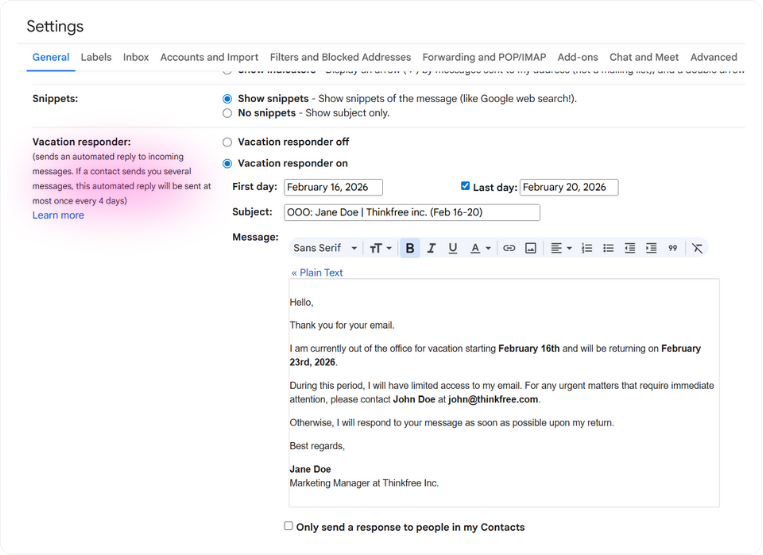
- Automate: Navigate to ‘Settings’ → ‘General’ → ‘Vacation responder.’ Craft a clear message indicating your return date and the point of contact for urgent matters.
- Pro-Tip: Don’t let a cluttered inbox haunt your last hour. Use Schedule Send for non-urgent replies. This allows you to clear your plate without triggering a chain of new emails right before you walk out the door.
Google Calendar: Declining & Protecting Your Return
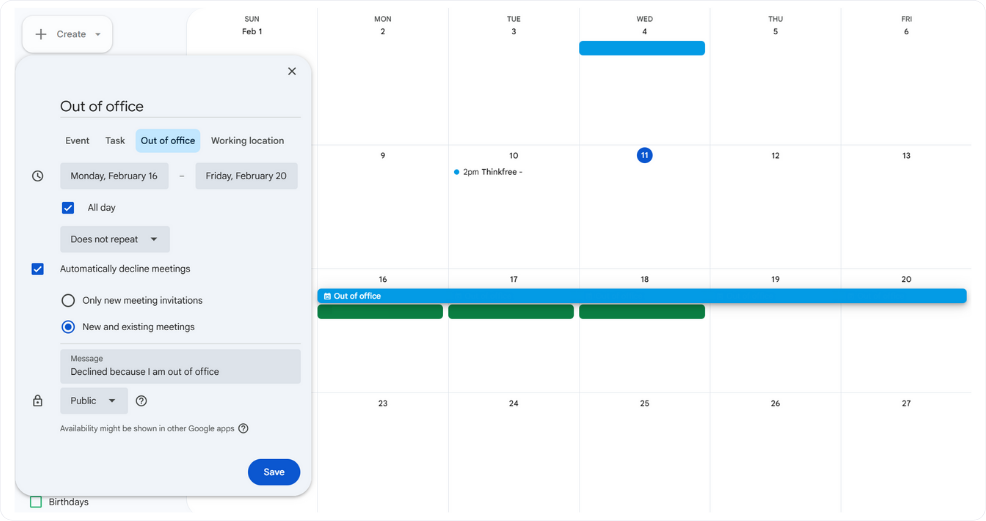
- The Guardrail: Use the ‘Out of Office’ entry type to automatically decline incoming meeting requests.
- The Buffer: Don’t return to a “meeting graveyard.” Use the Focus time feature to block the first four hours of your return. This gives you a dedicated window to catch up before the first “Welcome back” call hits your calendar.
Google Drive: Permissions & Accessibility
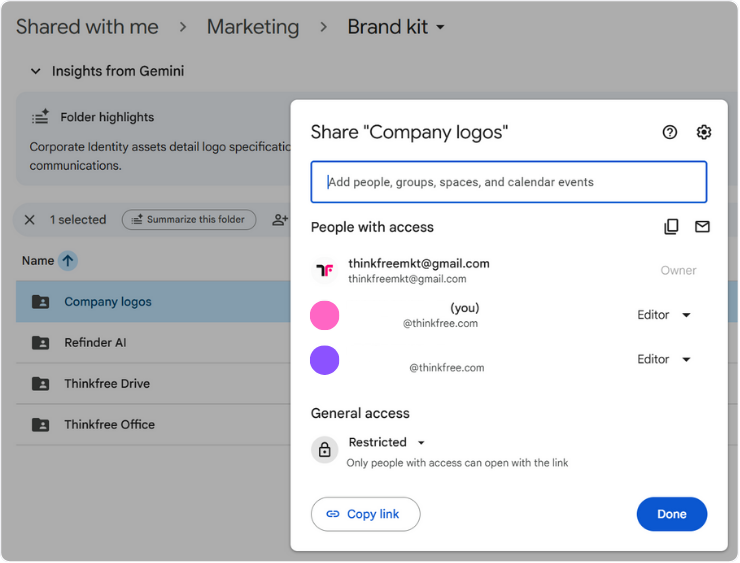
- Centralize: If key project files remain in your personal ‘My Drive,’ they are essentially locked away. Move them to Shared drives to ensure the team has continuous access.
- Audit: Review sharing settings. Ensure sensitive documents are restricted to specific stakeholders rather than set to ‘Anyone with the link.’
The Reality Check: Why Great Settings Aren't Enough
Following these steps ensures your tools are ready, and creating a single Handover Google Doc to organize active projects is a professional gold standard. But let’s be honest: even with a solid document, things rarely go perfectly.
Colleagues often struggle with the “missing context”—the ‘why’ behind a decision that wasn’t written down, or the ‘where’ of a file that was created at the last minute. This is where Knowledge Debt starts to accumulate.
Is Your Team Suffering from Knowledge Debt?
- [ ] Does project momentum stall the moment a key member goes on leave?
- [ ] Is “Where is that file?” a daily Slack refrain?
- [ ] Does it take 15+ minutes to find context for a past decision?
- [ ] Do important decisions get buried in endless message threads?
If you checked two or more, your team is likely struggling with knowledge debt—the accumulated cost of scattered information.
Refinder: Your AI-Powered Surrogate
What if your team could get answers instantly without pinging you on your break? Refinder acts as your team’s collective memory, integrating with Slack or Google Chat. Learn more about Refinder AI Agents:
- Instant Context: When a colleague asks about the “Q3 Strategy,” Refinder scans Drive and Confluence to provide the correct, most recent link.
- Decision Tracking: Instead of digging through Jira, Refinder summarizes why a decision was made, citing past meeting minutes and discussions.
Refinder also helps you dive back into work quickly after your vacation. Instead of checking hundreds of notifications, sync with your team in just 10 minutes.
- Project Update Briefings: “Summarize the changes to Project Beta while I was away.” Refinder highlights the core changes based on editing history.
- Catching Up on Meetings: Ask Refinder for the agenda and decisions of missed meetings. It finds the notes and it even flags action items assigned to you need to take.
- Tracking Discussion Threads: For topics discussed across multiple channels (e.g., “Server Outage Resolution”), Refinder aggregates conversations from Gmail and Jira into a chronological summary.
Don't Just Be Irreplaceable; Be Scalable
Don't be irreplaceable. If you can't be replaced, you can't be promoted.
— The Pragmatic Programmer
A resilient team doesn’t rely on individuals; it relies on accessible intelligence. With Refinder, you transform personal expertise into a team asset, allowing you to enjoy a truly peaceful vacation.
Ready to eliminate knowledge gaps?
Connect Refinder to Slack or Google Chat. 👉
Like this post? Share with others!